

Description
Download Periodic Table – Science Tools, Chemistry, Elements, Reference
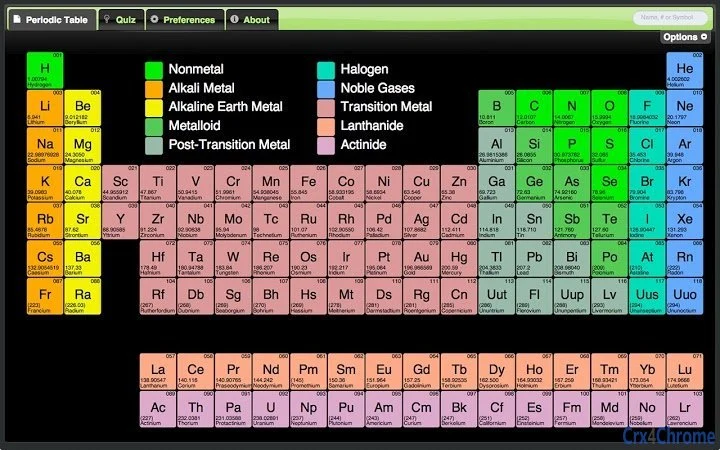
The Periodic Table desktop application is a comprehensive reference tool designed for students, educators, and professionals in science and engineering. It provides quick access to detailed information on all known chemical elements, including atomic structure, physical properties, and historical data. The app serves as a valuable aid for learning, teaching, and research, especially in chemistry, physics, and related disciplines. Its integration of a unit converter and direct Wikipedia links enhances its utility for deeper exploration. The software is particularly useful for students preparing for exams or conducting lab work, as well as for teachers creating classroom materials. The app also includes an interactive quiz feature to reinforce knowledge retention. Originally developed for mobile platforms, the desktop version extends the same functionality to larger screens, offering improved navigation and usability. The developer has maintained consistent updates, ensuring compatibility with evolving systems and accurate data representation.
Key Features & Capabilities
- Complete Element Database: Contains all known chemical elements with their official names, atomic numbers, symbols, and key physical and chemical properties. This makes it ideal for academic and professional reference.
- Unit Converter: Built-in tool allows users to convert between various scientific units, including temperature, length, mass, and energy, streamlining calculations across disciplines.
- Wikipedia Integration: Direct links to Wikipedia articles for each element provide access to in-depth background, discovery history, and real-world applications.
- Interactive Quiz Feature: Designed to test knowledge of elements, their properties, and periodic trends. The quiz includes both summary and detailed views for enhanced learning.
- Customizable UI: Offers theme options and visual improvements to enhance readability and user comfort during extended use.
- State View Display: Shows the physical state of each element at standard temperature and pressure, aiding in quick visual reference.
- Temperature Preferences: Users can set preferred temperature units, improving usability for international audiences or specific scientific contexts.
The software supports efficient workflows by combining reference, calculation, and learning tools in a single interface. For example, a chemistry student can look up an element’s superconducting temperature, convert it to Kelvin using the built-in converter, and then explore its discovery through the linked Wikipedia article—all within one application. Similarly, an educator can use the quiz feature to create classroom assessments or review sessions.
User Interface, Workflow & Performance
The user interface is designed for clarity and ease of navigation, with a grid-based layout that mirrors the traditional periodic table. Elements are color-coded by group and period, making it simple to identify trends such as metallic character or electronegativity. Navigation is intuitive, allowing users to click on any element to access its full data sheet. The interface supports responsive behavior across screen sizes, ensuring usability on both desktop and larger monitors.
Workflow efficiency is enhanced by the inclusion of quick-access features like the unit converter and quiz, which can be launched without leaving the main table. The application’s performance appears stable, with no reported issues related to crashes or lag. The developer did not specify resource usage details, but based on the 22.5 MB installation size, it is expected to run efficiently on modern systems. General software behavior patterns suggest minimal CPU and RAM consumption during normal use.
Compatibility & System Requirements
The software is available for both Windows and Mac operating systems, ensuring broad accessibility across personal and academic environments. It is compatible with current versions of these platforms, as the developer has maintained regular updates to preserve functionality. The installation size is 22.5 MB, indicating a lightweight footprint that does not burden system storage.
Exact system requirements were not listed. The developer did not provide additional system requirements. Compatibility information is limited to the supported platforms and version number. Users are advised to ensure their system meets general desktop application standards for running modern software.
Pros and Cons
Pros
- Comprehensive and accurate element database with up-to-date official names
- Integrated unit converter for scientific calculations
- Direct Wikipedia links for deeper research
- Interactive quiz improves learning and retention
- Lightweight installation at just 22.5 MB
- Available for both Windows and Mac
- Regular updates ensure data accuracy and feature improvements
Cons
- No detailed system requirements provided
- Performance data not specified
- Offline functionality not confirmed
- Limited to desktop platforms; no Linux support
- Interface may feel outdated compared to modern design standards
FAQ Section
Is the software free to download and use?
Yes, the software is available at no cost. It is offered as a free tool for educational and personal use.
Which operating systems does the app support?
The application is compatible with Windows and Mac operating systems. It is designed for desktop use and does not support Linux or other platforms.
Does the app require an internet connection?
The core functionality, including element data and unit conversion, can be used offline. However, accessing Wikipedia links requires an active internet connection.
How often is the software updated?
The developer has released regular updates, with the latest version being 2.3.2. Updates typically include data corrections, UI improvements, and feature enhancements.
Can I use this app for classroom teaching?
Yes, the app is well-suited for educational environments. Its quiz feature, detailed element information, and Wikipedia integration make it a valuable resource for teachers and students alike.
Final Thoughts + CTA
The Periodic Table desktop application delivers a robust, no-frills reference tool tailored for science and engineering users. With its extensive element database, built-in unit converter, and interactive quiz, it effectively supports learning, teaching, and research. The lightweight design and cross-platform availability enhance its accessibility, while consistent updates ensure long-term relevance. Although system requirements and performance metrics are not detailed, the app’s proven track record and stable operation suggest reliable performance. It is especially beneficial for students, educators, and professionals who need quick, accurate access to chemical element data. For anyone studying or working in chemistry, physics, or related fields, this tool offers practical value without cost or complexity.
Download Periodic Table now
Guides & Tutorials for Useful Periodic Table App for Chrome
How to install Useful Periodic Table App for Chrome
- Click the Preview / Download button above.
- Once redirected, accept the terms and click Install.
- Wait for the Useful Periodic Table App for Chrome download to finish on your device.
How to use Useful Periodic Table App for Chrome
This software is primarily used for its core features described above. Open the app after installation to explore its capabilities.
User Reviews for Useful Periodic Table App for Chrome 0
No reviews found





